
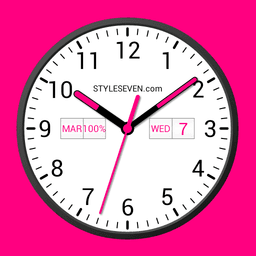
Tangkapan layar
Tentang Analog Clock Widget Plus-7
Analog Clock Widget Plus-7 adalah aplikasi tampilan jam serbaguna yang menghidupkan penunjuk waktu dengan desain jam analog dan digital yang dapat disesuaikan. Baik Anda membutuhkan overlay mengambang, widget layar beranda, wallpaper hidup, atau tampilan layar penuh, aplikasi ini beradaptasi dengan gaya hidup dan pengaturan perangkat Anda.
Ubah cara Anda melihat waktu di perangkat Android Anda. Tampilkan waktu saat ini bersama informasi berguna seperti tanggal, hari dalam seminggu, bulan, dan pengisian daya baterai. Widget jam analog mendukung berbagai mode tampilan: gunakan sebagai overlay mengambang yang diposisikan di mana saja di layar Anda melalui drag-and-drop, atur sebagai wallpaper hidup dengan ukuran dan penempatan yang dapat disesuaikan, tambahkan sebagai widget layar beranda standar, atau aktifkan mode layar penuh dengan perlindungan layar aktif. Setiap mode memungkinkan Anda menyesuaikan tampilan, ukuran, dan posisi agar sesuai dengan preferensi Anda.
Ciptakan pengalaman jam yang dipersonalisasi dengan opsi gaya yang luas. Pilih antara gaya dial terang dan gelap, pilih dari berbagai font (serif, sans serif, bold, monotype), dan sesuaikan warna latar belakang serta warna jarum sekunder. Tambahkan gambar latar belakang kustom atau beralih ke tampilan teks abu-abu untuk tampilan minimalis. Alihkan visibilitas jarum detik, aktifkan format waktu 12 atau 24 jam, dan posisikan elemen informasi seperti hari dalam seminggu dan tanggal di mana saja pada dial—atau sembunyikan sepenuhnya.
Lindungi layar Anda dan hemat baterai dengan fitur cerdas. Mode Jam Malam (Night Clock) menggunakan desain jarum abu-abu gelap pada latar belakang hitam untuk mengurangi konsumsi daya sambil mempertahankan kegunaan. Fitur perubahan posisi acak, yang diperbarui setiap menit, mencegah burn-in layar pada perangkat yang menampilkan jam secara terus-menerus. Aktifkan fungsi Selalu di Layar (Always on Screen) untuk menjaga jam tetap terlihat bahkan saat layar perangkat Anda mati, dengan kontrol kecerahan dan opsi kunci otomatis untuk mengoptimalkan penggunaan baterai.
Tambahkan umpan balik audio ke jam Anda. Aktifkan pengumuman suara untuk mendengar waktu saat ini dengan mengetuk dua kali tampilan atau atur pengumuman berkala pada interval 1, 5, 15, 30, atau 60 menit. Widget dapat mengucapkan waktu saat disentuh, memberi Anda akses bebas genggam ke informasi waktu.
Gunakan Analog Clock Widget Plus-7 sebagai screensaver saat perangkat Anda mengisi daya, memastikan ponsel Anda tetap berguna bahkan dalam mode siaga. Semua fitur—Jam Malam (Night Clock), emulasi Selalu di Layar (Always on Screen), pengumuman suara, dan opsi penyesuaian—berfungsi mulus di seluruh mode layar penuh, wallpaper hidup, dan tampilan screensaver. Dengan kontrol visual yang menunjukkan perubahan secara real time, Anda dapat mendesain antarmuka jam sempurna Anda secara instan.
Kelebihan & Kekurangan
Kelebihan
- Multiple display modes adapt to different use cases and device layouts
- Extensive customization options for colors, fonts, and visual elements
- Night Clock mode and position-change feature help reduce screen burn-in
- Voice announcements provide hands-free access to time and date information
Kekurangan
- Always-on-Screen mode and floating overlay may drain battery over time
- Requires permissions for accessibility and overlay access to function fully
- Voice announcements depend on text-to-speech quality and device audio setup
- No mention of cloud sync or settings backup across devices
Pertanyaan umum tentang Analog Clock Widget Plus-7
Apakah Analog Clock Widget Plus-7 aman untuk diunduh?
File Analog Clock Widget Plus-7 di Unstore dipindai untuk mendeteksi malware pada 20 Mei 2026. Pemindaian tidak menemukan ancaman dan memberikan skor risiko 20/100 (makin rendah, makin aman).
Apa saja persyaratan sistem untuk Analog Clock Widget Plus-7?
Analog Clock Widget Plus-7 berjalan di Android. Aplikasi ini memerlukan Android 5.0 (Lollipop) atau yang lebih baru. Ukuran unduhannya 8.2 MB.
Apa versi terbaru Analog Clock Widget Plus-7?
Versi terbaru Analog Clock Widget Plus-7 di Unstore adalah 2.0. Terakhir diperbarui pada 27 Juli 2026.
Siapa pengembang Analog Clock Widget Plus-7?
Analog Clock Widget Plus-7 dikembangkan oleh Style-7.
Aplikasi Terkait

Microsoft PowerToys
Utilitas Windows dan alat produktivitas — tingkatkan alur kerja Anda dengan alat sistem, manajemen jendela, dan fitur pratinjau file.

Windows Essentials 2012
Email, pesan, pengeditan foto, pembuatan video, dan penyimpanan cloud—Windows Essentials 2012 mencakup semua alat produktivitas yang Anda butuhkan.

Free Download Manager
Manajer unduhan yang mempercepat transfer, mengatur file berdasarkan jenis, dan menyinkronkan dengan Firefox dan Chrome.

HWiNFO
Pemantauan perangkat keras untuk Windows—lacak suhu CPU, beban GPU, kecepatan kipas, voltase secara real-time.

TransMac
Baca drive Mac dan file DMG di Windows. Akses penyimpanan APFS/HFS+ dan buat image disk.

TestDisk & PhotoRec
Pulihkan file yang hilang dan perbaiki partisi disk — alat pemulihan data open-source gratis untuk Windows.
Artikel terbaru

Pengonversi angka Romawi gratis online: instan, tanpa daftar, bekerja di ponsel Anda
Oct 6, 2026

Papan tulis online gratis seperti Jamboard: gunakan Quickboard di browser Anda, tanpa pendaftaran
Oct 6, 2026

Mainkan permainan Color Ball Sort Puzzle gratis di browser (tanpa unduhan)
Oct 6, 2026

Mainkan kart racer gaya Beach Buggy Racing gratis di browser (tanpa unduhan)
Oct 6, 2026

Mainkan game bergaya Alto's Adventure gratis di browser (tanpa unduhan)
Oct 6, 2026